ASC — Medication Administration Record (MAR)
Note
The following describes an opt-in feature for practices that have ambulatory surgery centers (ASCs). To enable this feature for your organization, contact your CSM. For more information, see ASC Setup: Enable ASC Features.
Use the Medication Administration Record (MAR) in the Surgical Case Visit Layout to order, administer, document, and review medications for surgical use.
The MAR is available in the Pre, Intra, and Post stages of a surgical case. MAR orders and MAR administrations are not yet available in reporting, CCDA, or APIs.
Before you begin
| Task | Required permission or role |
|---|---|
| Add, edit, delete, and administer MAR orders | Clinicals: Edit Chart permission and you must be assigned as a delegate |
| Sign off on MAR orders | Supervising Provider - Clinicals role or the Clinicals: MAR Order Sign-Off permission |
| Configure the MAR Order Configuration page | MAR Order Configuration Admin permission or the Clinicals Admin role |
| Acknowledge delegate-entered orders | Clinicals: Order/Prescription Sign Off and Clinicals: MAR Order Sign-Off permissions |
| Configure delegates | Clinicals Admin: Order Delegation permission |
 MAR columns and order sorting
MAR Orders
The MAR Orders column displays the patient's active and discontinued medication orders.
Status
The Status column displays the current administration status of each medication order, including the phase and time of the scheduled order.
The MAR flowsheet categorizes medication orders in the following order from top to bottom:
-
Active
-
Discontinued (D/C)
-
Completed
Note
Completed orders are grayed out on the MAR flowsheet and are sorted with the most recent completed order at the top of that section.
Schedule
You can view when a patient’s medication needs to be administered in the timeline portion of the flowsheet.
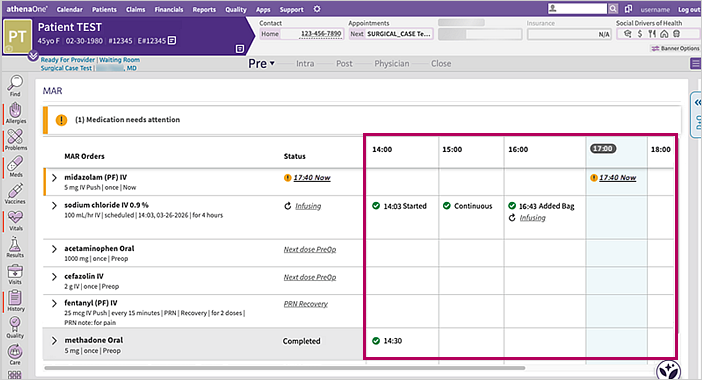
| Icon | Description |
|---|---|

|
Medication administration is complete |

|
Medication administration needs attention |

|
IV fluid or medication was continuously administered |

|
IV fluid or medication is actively being administered and not yet stopped |
The MAR flowsheet schedule begins at the time of the appointment or when the first ordered dose is administered, whichever is first. You cannot administer orders before the day of the appointment or after the 23:59 mark of the next day.
For overnight stays, the MAR flowsheet displays the date underneath the time cell.
Note
The MAR within athenaClinicals for Hospitals & Health Systems is unchanged. There are also no changes to medication management in athenaClinicals for prescribing and general clinic visit use across all encounter layouts.
Key terms
MAR order status types
| Term | Definition |
|---|---|
| Draft | Orders not available on the MAR for administration because required details are missing or approval is still needed through a sign or entry action. |
| Active | Orders available for MAR administration. Order details are locked in a non-edit state. |
| Discontinued | Active orders scheduled to no longer be administered. The MAR reflects the discontinue details on the active order. |
Order entry
| Term | Definition |
|---|---|
| Ordering provider | The prescriber ordering the medication. |
| Ordering method | How an order was received from the prescriber. |
| Verbal | The order was verbally communicated by the prescriber. |
| Transcribed | The order was written by the prescriber and then entered as a MAR order. |
| Standing | A routine order approved by the ASC, consistent with established policies, procedures, and protocols. |
| Delegate | A licensed agent of the prescriber entering orders on their behalf that later require sign off by a prescriber. |
| Prescriber | A licensed clinician with prescribing and MAR order sign-off authority. |
Scheduling
| Term | Definition |
|---|---|
| Priority | Indicates when an order should start. |
| STAT | An order that requires immediate action per ASC policy and procedures. |
| Now | An order that should be carried out promptly per ASC policy and procedures. |
| Scheduled | Orders planned for administration at a future date or time, or aligned with a procedure phase such as Pre-Op, Intra-Op, Recovery, or Post-Op. Scheduled orders may also be marked PRN. |
Note
All STAT and Now orders require additional communication with the clinician responsible for administration so they can be delivered as urgently as intended.
Medication dose scheduling
| Medications ordered as... | Appear on the MAR... |
|---|---|
| STAT or Now | to start when the order is entered, along with other scheduled doses based on their frequency and duration. |
| Scheduled for a specific date and time | in the corresponding time block with any other scheduled doses based on the ordered frequency and duration. |
| Scheduled to a specific phase of care | when the first dose is administered. Any later scheduled doses appear on the MAR based on the ordered frequency and duration. |
Note
-
When a medication is scheduled to be administered more than once for a phase of care, you can view the remaining dose schedule after you record the first dose.
-
Medications ordered as Scheduled may also be marked as PRN.
-
PRN medications are not scheduled on the flowsheet.
IV fluids and IV medications
| Term | Definition |
|---|---|
| Started | Administration signed as started |
| Continuous | Administration is in progress |
| Added Bag | A new IV bag is added to continue the infusion |
| Stopped | The infusion is signed as done and is no longer infusing |
Note
IV medications must be marked as push when intended. Otherwise, athenaOne automatically marks them as an IV drip.
MAR Order Configuration admin page
Within the MAR Order Configuration admin page, on the Procedure MAR Orders tab, you can create one or more order sets and add them to the patient chart to speed up order entry and pre-populate order sig details.
In addition, you can access MAR orders in the Diagnosis & Orders cart in the Physician stage of the surgical case.
Step-by-step instructions
Add available medications and sig combinations
-
On the Main Menu, click Settings
 > Clinicals.
 -
In the left menu, under Practice Links - Order Configuration, click MAR Order Configuration.
Tip: Alternatively, enter text in the search box.
The MAR Order Configuration page appears, with the Procedure MAR Orders tab displaying. -
Click the MAR Order Configuration tab at the top.
The MAR Order Configuration tab appears. -
Click the add icon
 in the top right corner.
The Medications window appears. -
Enter the name of the medication you want to add and select the appropriate option from the dropdown menu.
The option you selected appears in the list of medications. -
Click the expand icon
 next to the medication you added.
 -
Click Add Sig.
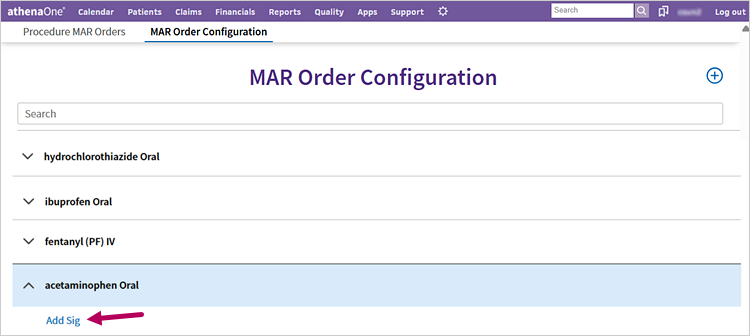
The sig details appear. -
Complete the sig details as appropriate:
-
Procedure Stage
-
Sig
-
Dose Amount
-
Dose Unit
-
Frequency
-
PRN
-
PRN Note
-
Duration Type
-
Duration Amount
-
Duration Unit
-
-
Note
-
-
Click Save.
The details you entered appear below the medication on the MAR Order Configuration tab.
Note
-
You can delete a medication from the ASC Order Configuration admin page by hovering your cursor to the right of the medication and clicking the trash can icon
 .
. -
You can edit a medication sig by hovering your cursor to the right of the medication and clicking the pencil icon
 .
.
Medications or sigs you delete are removed from the associated order sets. Similarly, medications or sigs you edit are reflected in the associated order sets.
Add or manage medication preference cards
-
On the Main Menu, click Settings
> Clinicals. -
In the left menu, under Practice Links - Order Configuration, click MAR Order Configuration.
Tip: Alternatively, enter text in the search box.
The Procedure MAR Orders page appears.Note
There must be at least one medication and sig added in the MAR Order Configuration page before you can create an order set in the Procedure MAR Orders page. -
Click Add new card in the top right corner.
A new order set card appears under the listed order sets. -
Click the expand icon
next to the new order set card. -
Click the pencil icon
to rename the order set card.
The order set card name becomes editable. -
Enter an appropriate name for the order set card.
-
Click Add Meds.
The MAR Order Formulary window appears. -
Check the box next to the medications you want to add to the order set.
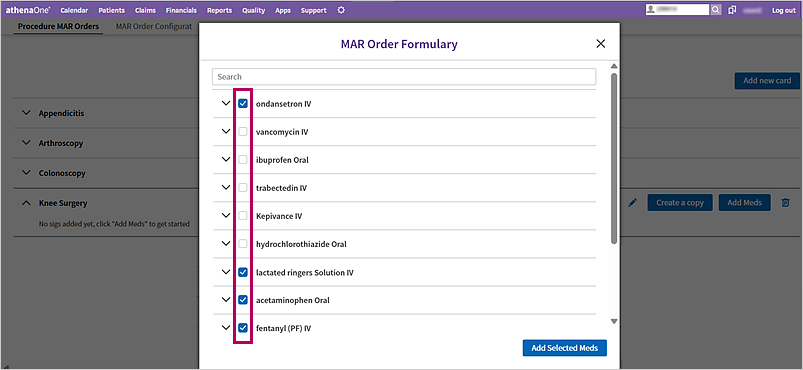
-
Click Add Selected Meds.
The selected medications appear underneath the order set card.
Note
-
To delete an order set, click the trash can icon
next to the order set card you want to delete. -
To copy an order set, click Create a copy next to the order set card you want to copy.
The copy of the order set appears at the top of the Procedure MAR Orders page with the word “copy” after it. Be sure to rename the copied order set card.
Add MAR orders to the surgical case
-
In the Physician stage of the surgical case, click the add icon
next to Diagnosis & Orders.
The Diagnosis & Orders cart opens. -
Under MAR Orders, click the order you want to add.
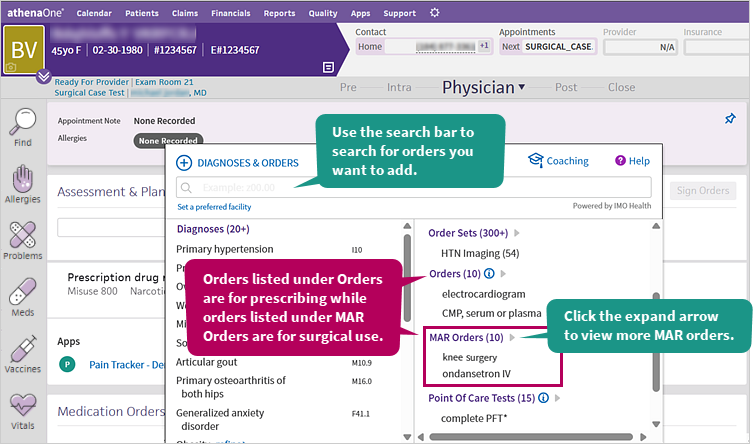
Note
-
You can click the expand arrow next to MAR Orders to view more options.
-
Alternatively, you can search for the order via the search bar under Diagnoses & Orders.
-
Medications listed under Orders are for prescribing while orders listed under MAR Orders are for surgical use.
The order appears in the Medication Orders section under Drafts. A temporary message also appears in the bottom left corner to confirm you successfully added the medication.
-
-
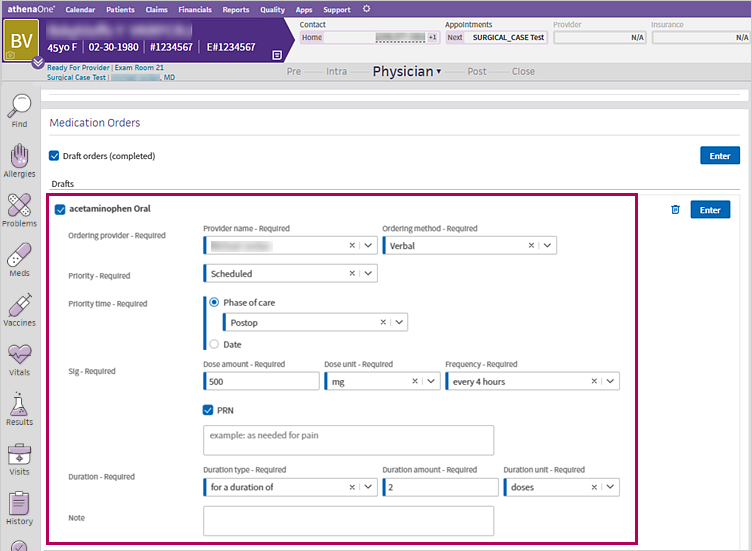
Under Drafts, click the medication to expand its sig details.
-
Complete the sig details as appropriate:
-
Order provider – Required
-
Provider name – Required
-
Ordering method - Required
-
-
Priority - Required
-
Priority time – Required
-
Phase of care
Note
Medications assigned to a phase of care can be added at any time during that stage. -
Date
-
-
Priority time – Required
-
Phase of care
-
Date
-
-
Sig – Required
-
Dose amount – Required
-
Dose unit – Required
-
Frequency - Required
-
-
PRN
-
Duration – Required
-
Duration type – Required
-
Duration amount – Required
-
Duration unit - Required
-
-
Note
-
-
Click Sign if you are a prescriber or Enter if you’re a delegate to mark the order as active for administration on the MAR.
Important
Be sure to confirm all draft orders are accurate before signing or entering them.
Edit MAR orders you entered for the surgical case
-
In the Physician stage of the surgical case, in the Medication Orders section, click the order you want to edit under Drafts.
The order expands.
-
Complete the sig details as appropriate:
-
Order provider – Required
-
Provider name – Required
-
Ordering method - Required
-
-
Priority - Required
-
Priority time – Required
-
Phase of care
Note
Medications assigned to a phase of care can be added at any time during that stage. -
Date
-
-
Priority time – Required
-
Phase of care
-
Date
-
-
Sig – Required
-
Dose amount – Required
-
Dose unit – Required
-
Frequency - Required
-
-
PRN
-
Duration – Required
-
Duration type – Required
-
Duration amount – Required
-
Duration unit - Required
-
-
Note
-
-
Click Sign if you are a prescriber or Enter if you’re a delegate.
Important
Be sure to confirm all draft orders are accurate before signing or entering them.The order appears under the Active section and is available on the MAR for administration.
Note
You can only edit medications in Drafts. If you want to edit an active medication, you need to discontinue it and reorder it as appropriate.
Delete an order from your drafts
In the Physician stage of the surgical case, in the Medication Orders section, under Drafts, hover your cursor to the right of the order and click Delete.
athenaOne removes the order from the Drafts section. You cannot delete active or discontinued orders.
Discontinue an order
-
In the Physician stage of the surgical case, in the Medication Orders section, under Active, hover your cursor to the right of the order you want to discontinue and click Discontinue.
-
Complete the following fields:
-
Discontinuing provider – Required
-
Provider name – Required (for nurses only)
-
Discontinue method - Required (for nurses only)
-
-
Reason to discontinue – Required
-
Discontinue priority – Required
-
-
Click Discontinue.
The order moves under the Discontinued section. Click the discontinued order to expand and view its details.
Note
-
Orders entered by nurses are then discontinued in the MAR, but marked as sign-off required in the Medication Orders section.
-
Discontinued orders cannot be deleted.
Sign MAR orders entered by a nurse (as a prescriber)
MAR orders entered by nurses require sign-off by a prescriber with order sign-off privileges.
-
In the Physician stage of the surgical case, in the Medication Orders section, review the medications listed under Active and Discontinued for orders that need a prescriber sign-off, as indicated by a yellow NEEDS SIGN alert
 .
. -
Click the order to expand its details.
-
Review the order details and click Sign.
-
Repeat steps 2-3 for any other orders that need sign-off.
Bulk sign MAR orders
Alternatively, prescribers can bulk sign orders entered by delegates.
-
In the Physician stage of the surgical case, in the Medication Orders section, click the dropdown menu at the top and select your username.
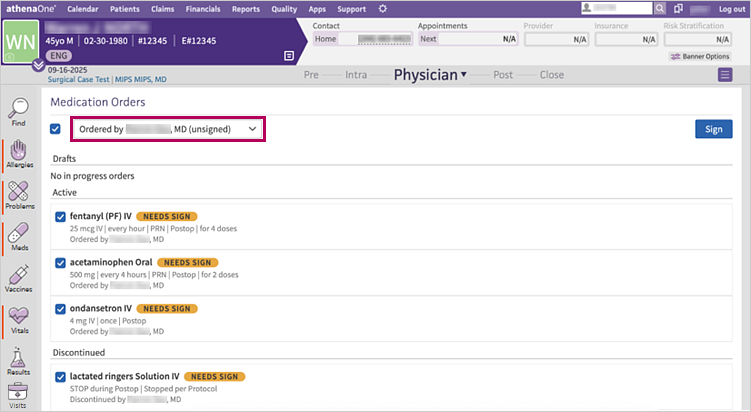
Selected checkboxes appear to the left of the medications assigned to you. -
Uncheck the boxes next to medications you don't yet want to sign if needed.
-
Click Sign in the top right corner.
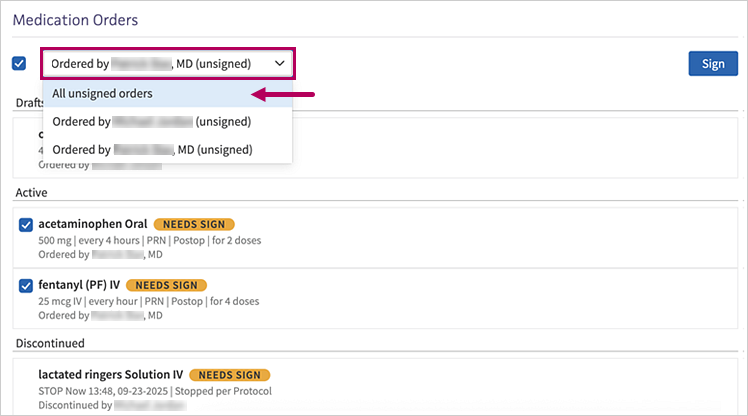
Prescribers can also sign off on medications that aren't assigned to them. To do so, click the dropdown menu under Medication Orders and select All unsigned orders or select the prescriber for whom you want to sign. Repeat steps 2-3 from above.
Administer medications in the MAR
-
In the Pre, Intra, or Post stage of the surgical case, click the arrow next to the stage name and select MAR from the dropdown menu.
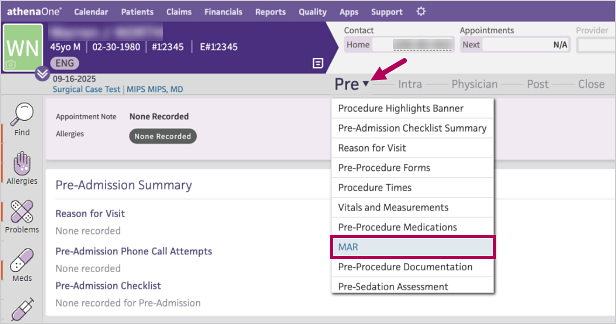
athenaOne automatically scrolls down to the MAR section.Note
Medication orders are sorted in order by priority, such as STAT, Now, Scheduled by Time, Stage (Pre, Intra, Recovery, Post), and PRN. -
Depending on the order schedule, click the:
-
Medication scheduled to a phase of care — Hover your cursor over the time cell you want to administer the medication for and click the add icon
.
The medication administration window appears with the current date and time auto-populated. -
Medication scheduled for a specific time — Click the time stamp for the medication you want to administer.
The medication administration window appears with the current date and time auto-populated.
-
-
Start time/date - Required — If you want to change the time and date, click the clock icon
 to select the appropriate time and the calendar icon
  to select the appropriate date.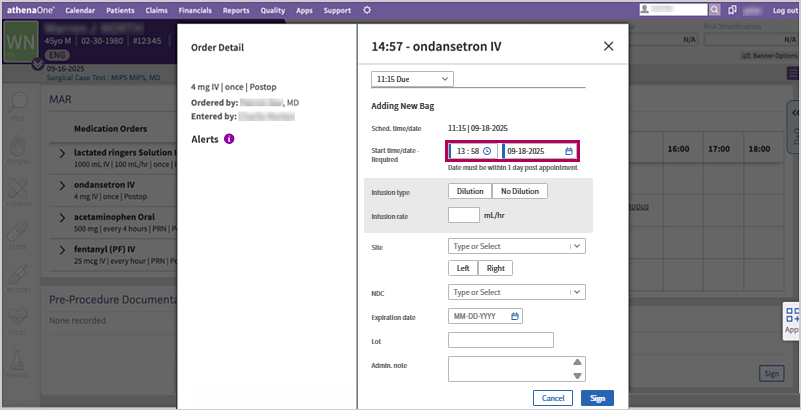
-
Complete all other fields as needed (optional).
-
Click Sign.
For IV drip medications — Once signed, click Started or Continuous in the MAR flowsheet, followed by clicking Add New Bag to add a new bag or discontinue the infusion by clicking Stop Bag Only.
For overnight stays — You can view the date in the medication administration window title and dropdown menu.
Edit or delete any recorded medication administration
-
In the MAR flowsheet, click the dose for the medication that you want to edit or delete.
The medication administration window appears. -
Click Edit.
The fields become editable and the Delete Administration or Delete Bag link appears, depending on if it's an IV fluid/medication or non-IV medication. -
Edit as needed or click Delete Administration or Delete Bag.
Note
-
If you delete a dose administration, the dose reverts to its previous scheduled status.
-
The clinician signing the administration is recorded as the medication administrator.
Acknowledge MAR orders in bulk
- In the Clinical Inbox, click the down arrow in the corner and select Delegated Orders from the dropdown menu.
The Delegated Orders/Authorizations page appears. -
Select the check box next to the orders you want to sign off on.
Note
You can click the Select All check box at the top of the page to select all listed orders across both tables.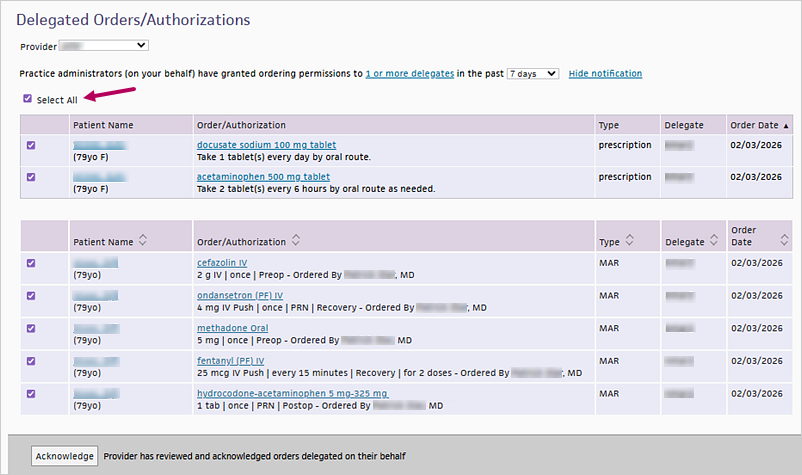
-
Click Acknowledge at the bottom of the page.
The orders you signed off on disappear from the Delegated Orders/Authorizations page.
Additional features
Medication warnings and interactions checking
A drug interaction warning appears in the surgical case for MAR orders and the MAR flowsheet if any of the following occurs:
-
The new medication conflicts with existing MAR orders
-
The new medication conflicts with the patient's current Medications, Allergies, or Problems lists
-
The patient is geriatric and the medication requires caution
Important
These warnings appear only in MAR workflows for the surgical case. They do not display on the chart medications list or during new active medication prescribing outside of the surgical case.
The warning is based on drug-drug, drug-allergy, drug-problem, or drug-geriatric interactions and ranges from moderate to serious to severe.
| Warning icon | Description |
|---|---|
|
|
Moderate interaction |

|
Serious interaction |

|
Severe interaction |
These warnings remain visible as you place and administer medication orders and cannot be hidden.
Note
Diluent checking is not supported at this time.
ASC medication warnings use the same user preference controls as ambulatory and hospital medication warnings. Users with access to the User Preferences admin page (Settings > User Preferences) can configure them in the Drug interaction warnings field.
You can view these medication alerts in the following places:
Order entry
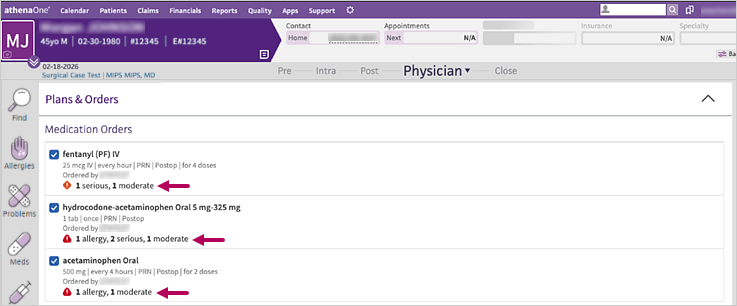
To view what triggered an alert for a medication during order entry, click the medication to expand it and see more details.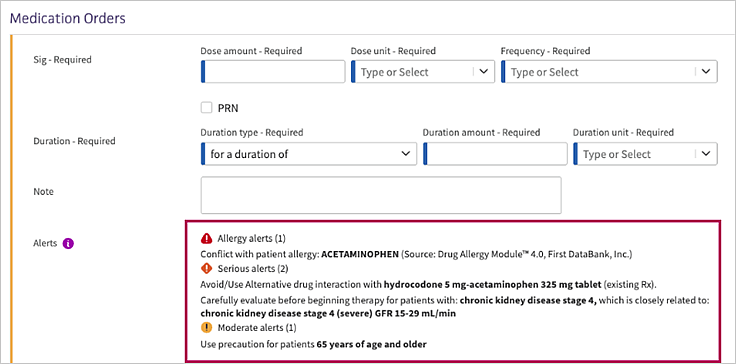
MAR flowsheet
To view what triggered an alert for a medication on the MAR flowsheet, click the medication to expand it and see more details.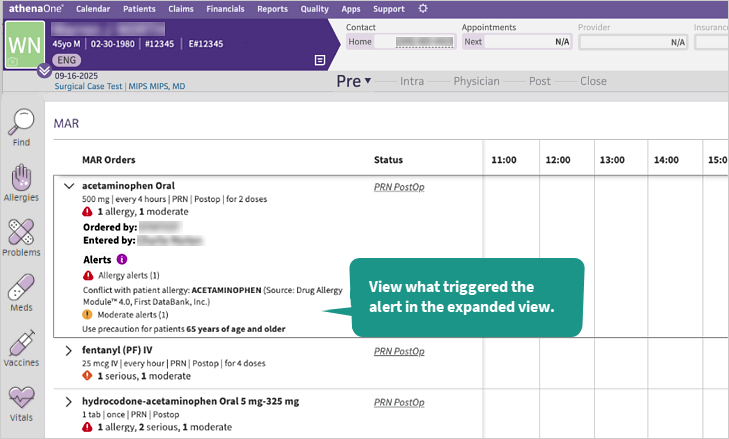
Medication administration window
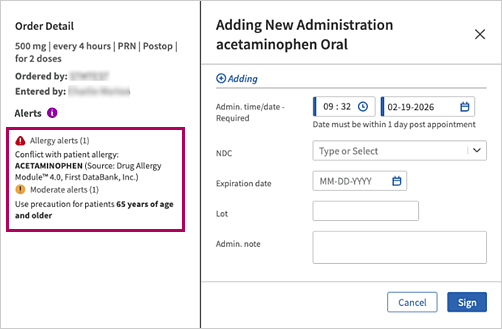
Dose warnings
You can view two types of dose warnings for MAR orders once you have entered dose amount, dose unit, and frequency:
-
Max daily dose: The highest or maximum total amount of medication that could be administered in a 24-hour period
-
Max single dose: The highest or maximum amount of medication that could be given at one time in a single administration
Note
-
Dose warnings use standard dosing limits for each medication order. Each order is checked separately without cumulative calculations or shared ingredients across orders
-
Dose warnings may be adjusted for a patient’s age based on the standard dosing limits. Dose warnings trigger only when the entered dose is higher than the recommended maximum daily dose or maximum single dose.
If there is inadequate information to perform dose range checking, athenaOne displays either one or both of the following warnings:
-
Single dosage range checking cannot be performed.
-
Max daily dosage range checking cannot be performed.
When medication interactions cannot be checked
When medication interactions cannot be checked, an alert displays in MAR orders and the MAR flowsheet due to either of the following:
-
The medication is obsolete and no longer orderable
-
The medication is no longer manufactured, but may temporarily have non-expired supply available
The alert states, “[Drug] could not be checked for drug interactions. Perform a manual review before proceeding.”
You can view this alert in the following places:
-
Order entry
-
MAR flowsheet
-
Medication administration window
Note
As medication status changes over time, you may need to update medication preference cards with new medications and sigs as needed. Review each impacted preference card and update as needed.
Surgical case encounter summary
You can view MAR orders and MAR administration activity such as who ordered, entered, and signed the order in patient encounter summaries.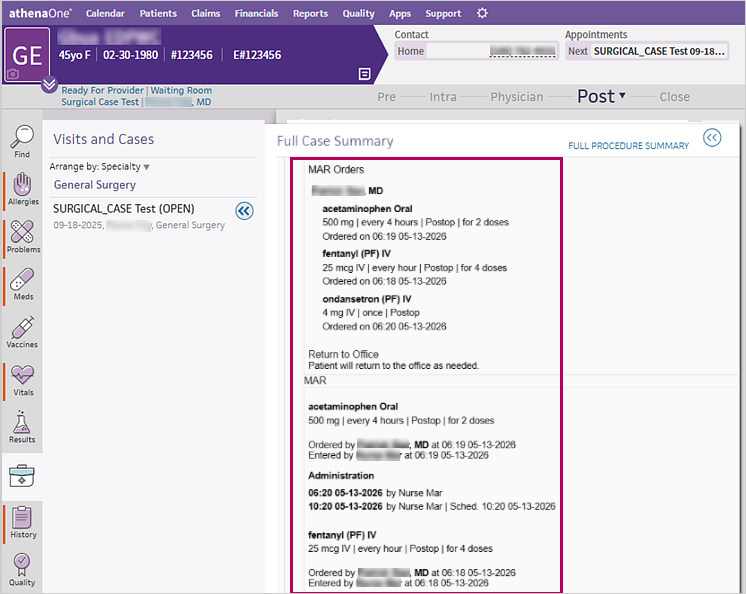
Note
Dates in the MAR section of the Full Case Summary, Full Procedure Summary, and Summary in the Visits tab, Close stage, and Find tab now display as MM-DD-YYYY.
MAR order delegation
Practice administrators and providers can now assign delegates for MAR orders through the new MAR order type group on the Order Delegation admin page (Settings > Clinicals > Order Delegation). Assigned delegates may include nurses. Only designated delegates can enter MAR orders and activate them for administration on the MAR flowsheet.
The following MAR orders are now included as order types:
-
MAR – Medications (IV)
-
MAR – Medications (Other Routes)
When adding an individual delegation, you can access the new MAR order types.
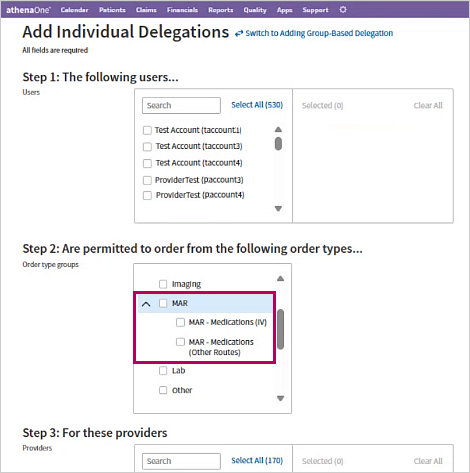
You can also access the new MAR order types when adding a group-based delegation.
Once you’ve assigned the MAR order type(s) to the appropriate delegate(s), they appear on the Order Delegation admin page.
Note
-
Deleting a delegate’s MAR order type from the Order Delegation admin page automatically removes the other MAR order type (IV or Other Routes), if it was assigned to that delegate. Both order types are maintained as one MAR order delegation.
-
MAR order delegates do not lose signing privileges, even if an order has aged without acknowledgment. Providers should regularly review delegate-placed MAR orders to avoid order acknowledgment aging.
Acknowledge MAR orders in the Clinical Inbox
When there are delegated orders pending review and sign-off (including MAR and other order types), a task is created in the provider’s Clinical Inbox with the Acknowledgment Required description.
Providers can then review MAR orders placed by delegates and acknowledge them in the Delegated Orders/Authorizations page.
In addition, providers can now acknowledge delegate-entered MAR orders in bulk from the Delegated Orders/Authorizations page without having to manually go through individual patient charts to sign or acknowledge delegate-entered MAR orders.
New MAR order type table in Delegated Orders/Authorizations admin page
You can view the new MAR order type table at the bottom of the Delegated Orders/Authorizations page. The table at the top of the page is for all other order types (such as prescription, lab orders, etc.).
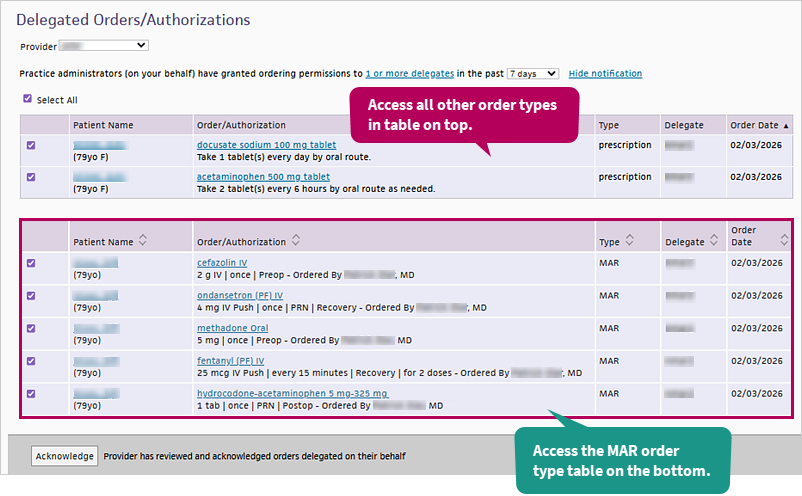
Once you acknowledge orders, they disappear from the Delegated Orders/Authorizations page.
Acknowledge MAR orders in bulk
- In the Clinical Inbox, click the down arrow in the corner and select Delegated Orders from the dropdown menu.
The Delegated Orders/Authorizations page appears. -
Select the check box next to the orders you want to sign off on.
Note
You can click the Select All check box at the top of the page to select all listed orders across both tables. -
Click Acknowledge at the bottom of the page.
The orders you signed off on disappear from the Delegated Orders/Authorizations page.
Note
Clicking a patient name or order brings you to the patient briefing.
Signing an order on behalf of another provider
If any of your MAR orders on the Delegated Orders/Authorizations page have unsigned components, an info icon  appears next to the unsigned order and at the top of the page. Hover your cursor over the info icon next to the order to view who has not signed the order.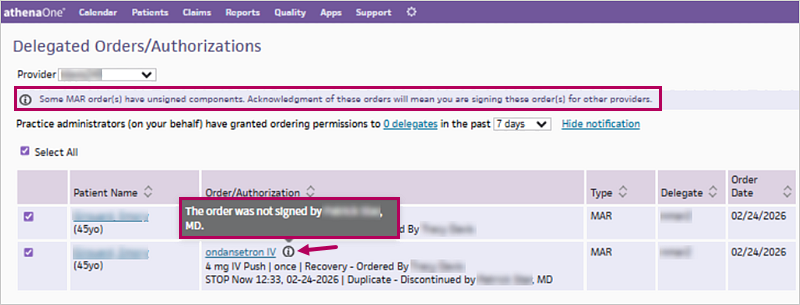
If you acknowledge an unsigned order, you would be signing the order on behalf of yourself and the other collaborating provider.